


In today’s digital age, privacy is paramount. Whether you’re looking to keep sensitive information away from prying eyes or simply want a cleaner home screen, hiding apps can be an effective solution.
Both Android and iOS offer methods to conceal apps, albeit in different ways. This blog will guide you through the step-by-step procedures for hiding apps on android and IOS, while also examining their privacy features and comparing their effectiveness.
Hiding Apps on Android
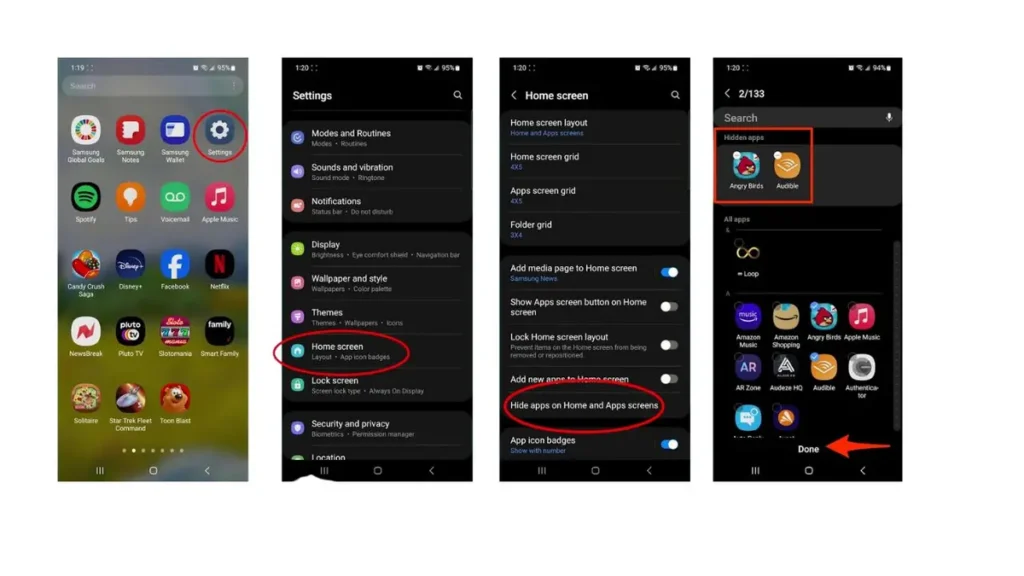
Android devices provide several methods to hide apps, depending on the manufacturer and the version of the operating system. Here’s a straightforward approach:
Step-by-Step: Hiding Apps on Android
- Using Built-in Features:
- Open the App Drawer: Swipe up from the bottom of your home screen.
- Select the Menu Icon: Look for three vertical dots or a settings gear icon in the top-right corner.
- Choose “Hide Apps”: Select the apps you want to hide and confirm your selection.
- Using a Third-Party Launcher:
- Download a Launcher: Go to the Google Play Store and download a launcher like Nova Launcher.
- Set the Launcher as Default: After installation, set it as your default launcher.
- Long Press on the App Icon: Choose the option to hide it in the settings of the launcher.
- Using App Lockers:
- Install an App Locker: Search for app locker apps on the Play Store.
- Select Apps to Lock: Open the app locker and select which apps you want to hide or lock with a password.
Privacy Features on Android
Android offers a variety of privacy features designed to protect user data:
- App Permissions: Users can manage permissions for each app, controlling what data and functions apps can access.
- Guest Mode: This feature allows users to create a temporary user profile, keeping personal data private when sharing the device.
- Scoped Storage: Introduced in Android 10, this feature restricts apps’ access to shared storage, enhancing privacy.
Hiding Apps on iOS
While iOS doesn’t allow users to hide apps in the same way Android does, it offers alternatives that still help keep your apps concealed. Here’s how to do it:
Step-by-Step: Hiding Apps on iOS
- Using the App Library:
- Swipe to the App Library: From your home screen, swipe left until you reach the App Library.
- Remove from Home Screen: Long press the app you want to hide, select “Remove App,” and then choose “Remove from Home Screen.” The app remains accessible from the App Library.
- Creating Folders:
- Group Apps Together: Drag the app you want to hide into a folder with other apps.
- Rename the Folder: Choose a name that doesn’t draw attention to the hidden app.
- Using Screen Time Settings:
- Go to Settings: Open the Settings app.
- Select Screen Time: Tap on “Content & Privacy Restrictions.”
- Choose Allowed Apps: Disable apps you want to hide from view, making them inaccessible without the passcode.
Privacy Features on iOS
iOS is known for its robust privacy features, including:
- Privacy Labels: The App Store includes privacy labels that inform users about the data collected by apps before downloading.
- Location Tracking: Users can choose whether to share their location with apps, with options for sharing “While Using” or “Never.”
- Data Minimization: iOS limits the amount of data shared with apps and provides users with transparency regarding data usage.
Comparison of Privacy Features
When comparing Android and iOS privacy features, several distinctions arise:
App Permissions
- Android: Offers granular control over individual app permissions, allowing users to change permissions dynamically.
- iOS: While also providing control, permissions are more tightly integrated with the system, often requiring more user consent upfront.
App Management
- Android: Users can hide apps using built-in features, launchers, or third-party app lockers. This flexibility caters to various user preferences.
- iOS: Focuses more on managing app visibility through the App Library and folders, emphasizing simplicity and user-friendliness.
Data Transparency
- Android: Generally offers less transparency about data collection and usage, with varied practices among different manufacturers.
- iOS: Provides privacy labels and strict guidelines for app developers, giving users clearer insights into how their data is handled.
Conclusion
Hiding apps on Android and iOS can be easily accomplished with the right techniques. Android offers a variety of built-in features, third-party options, and app lockers that provide flexibility in managing app visibility. In contrast, iOS relies on a more streamlined approach, with features like the App Library and Screen Time settings focusing on user-friendliness.


Both platforms prioritize user privacy but do so in different ways. Android provides granular permission control, while iOS emphasizes data transparency and minimizing data sharing. Ultimately, the choice of platform may depend on individual preferences for privacy and app management. Whichever system you choose, understanding these features can help you maintain a secure and organized digital space.