


How to Use Starlink in Kenya, A Comprehensive Guide
Starlink, the satellite-based internet service provider by Elon Musk, has become increasingly popular in Kenya. With its promise of high-speed internet, Starlink has revolutionized internet access, especially in remote areas where traditional broadband is unreliable or unavailable. This blog will guide you through everything you need to know about using Starlink in Kenya, from purchasing the equipment to setting up and getting connected.
1. Understanding Starlink and Its Benefits
Starlink provides high-speed internet via a network of satellites orbiting the Earth. Unlike traditional broadband, which relies on cables, Starlink uses satellites to deliver internet to your location, making it ideal for rural and underserved areas.
Benefits of Starlink in Kenya:
- Broad Coverage: Starlink can provide internet access in remote areas of Kenya where other services fail.
- High-Speed Internet: Offers competitive speeds, enabling activities like streaming, gaming, and video conferencing without significant lag.
- Affordable Packages: Starlink has introduced an affordable internet package for just KSh 1,300 per month, making it accessible to more people.
2. Getting Your Starlink Hardware in Kenya
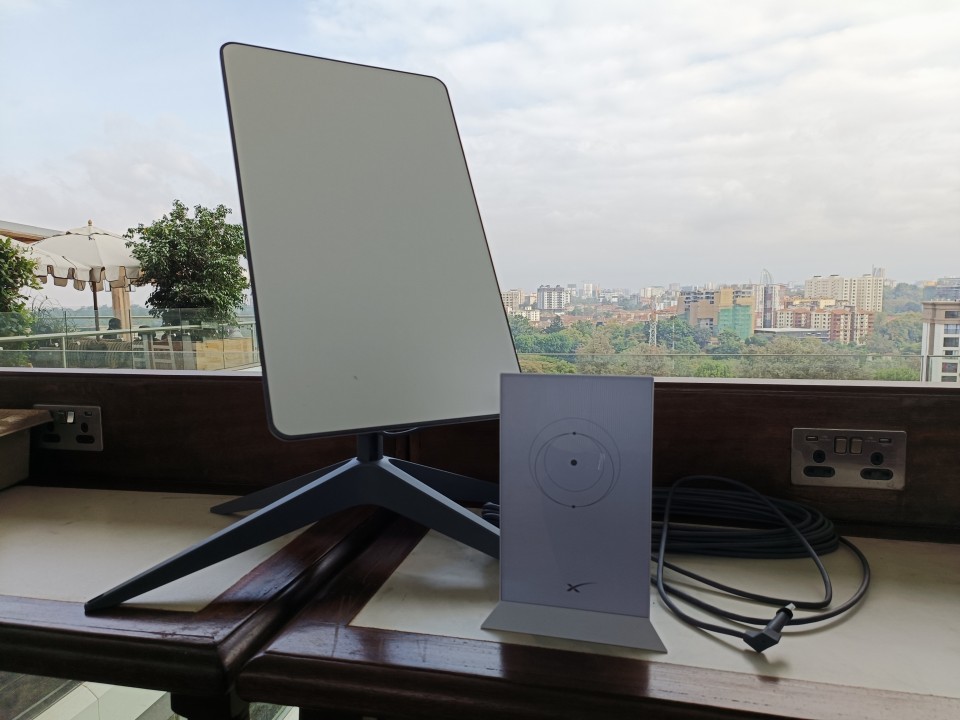
If you’re interested in Starlink, the first step is to get the necessary hardware. The Starlink kit includes a satellite dish, a stand, a router, and various cables. In Kenya, the cost of the Starlink hardware has dropped significantly, making it more accessible. Initially priced at around KSh 90,000, the kit is now available for KSh 30,000. You can purchase it from Starlink’s website or local electronic shops in Nairobi.
Unboxing Your Starlink Kit:
- Satellite Dish and Stand: This is the most important part of the kit, as it communicates with the Starlink satellites. The stand supports the dish to maintain a stable connection.
- Router: The router connects to the dish and distributes the internet signal to your devices.
- Cables and Power Cord: Ensure proper setup by connecting these correctly according to the instructions provided.
3. Setting Up Your Starlink in Kenya
Setting up Starlink is relatively straightforward, but there are a few steps you’ll need to follow carefully to ensure a proper connection:
How to Setup Starlink Step-by-Step in Kenya:
Assemble the Dish and Stand:
Follow the instructions to mount the dish on the stand securely. Make sure it’s placed in an open area with a clear view of the sky, free from obstructions like trees or buildings.
Connect the Router to the Dish:
Use the proprietary cable provided to connect the router to the dish. Ensure all connections are secure and weather-sealed to protect against moisture.
Power Up the System:
Plug in the power cord and switch on the router. The dish will automatically begin to calibrate itself to locate the Starlink satellites. This process might take a few minutes.
Download the Starlink App:
Available on both iOS and Android, the Starlink app will guide you through the setup process and help you manage your internet connection.
Create a Starlink Account:
Sign up on the app or Starlink website to activate your service. You’ll need to enter the serial number of your kit and provide your location details.
Choose a Service Plan:
Starlink offers several plans, including residential and business options. The new, affordable KSh 1,300 monthly package is a great choice for those looking to try out the service.
4. Troubleshooting and Tips
During setup, you might encounter some issues. Here are a few common problems and solutions:
- No Signal or Connection Issues: Ensure that your dish has a clear line of sight to the sky. Obstructions can interfere with the signal.
- Setup Location Unavailable: Some areas might not have the cheaper packages available due to network congestion. Check the app or website for the latest availability.
- High Data Usage or Slow Speeds: Monitor your data usage through the Starlink app to avoid throttling. For optimal performance, place the dish in an open area and minimize physical obstructions.

5. Future-Proofing Your Internet with Starlink
Investing in Starlink may seem costly initially, but it’s a wise long-term investment. With technology continuously evolving, having a reliable and fast internet connection is invaluable. Plus, Starlink is constantly upgrading its network and services, which means better speeds and coverage over time.
Why Choose Starlink in 2024?:
- Reliable Connectivity: Perfect for areas with unreliable or no internet service.
- Future Upgrades: Regular updates and improvements to the Starlink network mean better service and speeds.
- Global Reach: As a satellite service, Starlink isn’t confined by geography, providing a consistent internet experience even in Kenya’s most remote areas.
Read more about: Starlink Mini Launches in Kenya
Final Thoughts
Starlink in Kenya is an exciting development for those looking to improve their internet connectivity, especially in underserved regions. By following this guide, you can easily set up and start using Starlink in no time. With its affordability, reliability, and ease of use, Starlink is set to be a game-changer for internet access in Kenya.