How to Get Your MPesa Full Statement Proven Guide 2026
Are you Looking for How to Get Your MPesa Full Statement? Here’s a Proven Guide 2026 to Get Your MPesa Statement.
Whether you need proof of transactions for a loan application, tax records, or simply want to track your spending, knowing how to get your MPesa statement is one of the most practical skills every Safaricom subscriber should have. M-Pesa, Kenya’s leading mobile money platform, offers multiple convenient ways to access your transaction history. And this guide walks you through every one of them.
What Is an M-Pesa Statement?
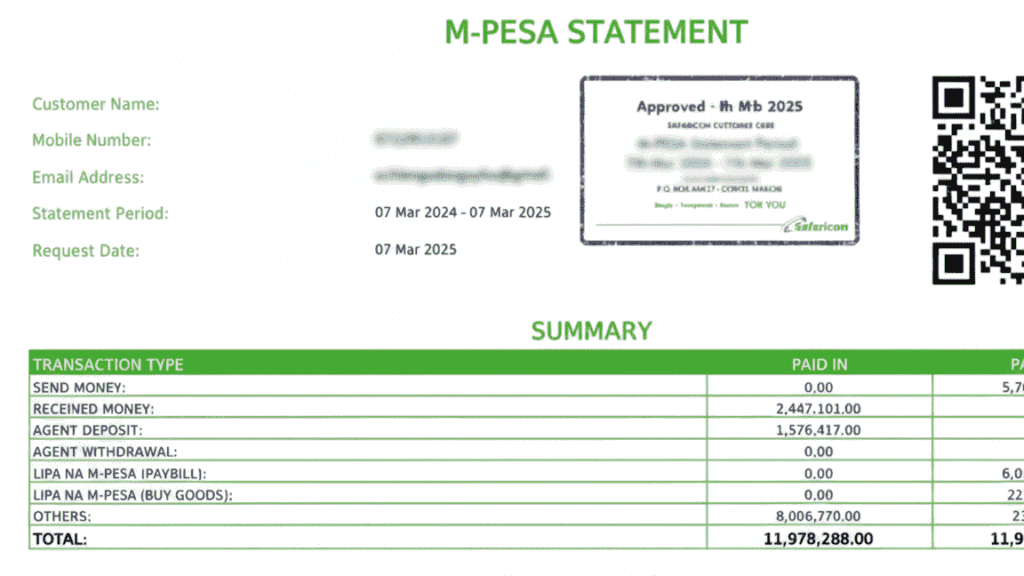
An MPesa statement is an official record of all transactions conducted through your M-Pesa account over a specified period. This includes money sent and received, Lipa Na M-Pesa payments, airtime purchases, bank transfers, and withdrawal activity. The M-Pesa full statement is a comprehensive version of this record, typically covering up to 12 months of activity, and is accepted as a formal financial document by banks, microfinance institutions, landlords, and government agencies.
Unlike the M-Pesa mini statement, which shows only the last five transactions via USSD. The full statement gives you a complete, downloadable, and printable breakdown of your financial activity. Understanding how to request an M-Pesa statement puts you in full control of your financial records.
Method 1: Request Your M-Pesa Statement via the M-Pesa App
The M-Pesa app is the fastest and most user-friendly way to access your M-Pesa statement in 2026. After a period of rising popularity, the M-Pesa statement app functionality has become one of the platform’s most-used features.
Steps to follow:
- Download the M-Pesa app from Google Play Store or Apple App Store if you haven’t already. Search “M-Pesa” and install the official Safaricom app.
- Log in using your M-Pesa registered phone number and PIN.
- Navigate to “My Account” or the “Statements” section.
- Select “Full Statement” and choose your desired date range.
- The statement will be generated and sent to your registered email address as a password-protected PDF.
The M-Pesa statement password follows a standard format: your ID number followed by your date of birth in the format DDMMYYYY. For example, if your ID is 12345678 and you were born on 5th March 1990, the password would be 1234567805031990.
Method 2: How to Request an M-Pesa Statement via Email (MySafaricom Portal)
For those who prefer a web-based approach, the M-Pesa statement online option through the Safaricom self-service portal is equally reliable.
Steps to follow:
- Visit www.safaricom.co.ke and log into your MySafaricom account.
- Go to “M-Pesa” and select “Request Statement.”
- Choose the statement period, you can request statements going back up to 12 months.
- Click “Submit.” The Safaricom M-Pesa statement will be delivered to your email within minutes.
This method is particularly popular for users requesting how to get an M-Pesa statement via email for formal submission. The PDF format carries an official Safaricom header and is digitally verifiable.
Method 3: M-Pesa Mini Statement via USSD
For a quick transaction overview, the M-Pesa mini statement is accessible instantly without internet access.
Steps to follow:
- Dial *334# on your Safaricom line.
- Select “My Account.”
- Choose “Mini Statement.”
This method uses the M-Pesa statement USSD code and displays your last five transactions on screen. While it doesn’t constitute a full M-Pesa statement, it’s useful for quick balance and activity checks.
N/B MPesa Full Statement
Dial *234# and choose My M-Pesa Information. Step 2: Select “M-Pesa Statement”. Choose Full Statement and opt to receive It.
Method 4: Visit a Safaricom Shop or Agent
If you require a printed, stamped M-Pesa statement. Often needed for bank loan applications or court proceedings. Thus, visiting a Safaricom shop in person is the recommended route.
What to carry:
- Your national ID or passport
- The phone number registered to your M-Pesa account
- Details of the period you need covered
At the Safaricom shop, staff will initiate an M-Pesa statement request on your behalf and either print it on the spot or send it to your email. This Safaricom M-Pesa statement option is ideal when an official stamp or letterhead is required.
How to Download Your M-Pesa Statement
Once your M-Pesa statement is sent to your email, follow these steps to access it:
- Open your email inbox and find the message from Safaricom.
- Download the attached PDF file.
- Open it using a PDF reader, enter the password (ID number + date of birth in DDMMYYYY format).
- Your full M-Pesa statement is now accessible for printing, saving, or sharing.
For repeat access, the M-Pesa statement download is always available through the app or portal without needing to re-request it within the same session.
Tips for a Smooth M-Pesa Statement Request
- Keep your registered email updated. All statements are sent electronically, so an outdated email means you won’t receive them.
- Know your statement password. It follows the format: ID Number + Date of Birth (DDMMYYYY). This is consistent across all Safaricom M-Pesa statement PDFs.
- Use the app for convenience. The M-Pesa app is the most direct way to access my M-Pesa statement on demand, anytime.
- Plan ahead for loan applications. Banks typically require three to six months of M-Pesa statements, so request them in good time.
- Request statements for specific periods. You can narrow the date range for targeted financial reporting.

Read Also: Mpesa Tariff Charges
Final Thoughts
Knowing how to get your M-Pesa full statement is no longer a complicated process. With the M-Pesa app, MySafaricom online portal, USSD mini statement option, and in-person Safaricom branches, Kenyans have more ways than ever to access their financial records quickly and securely. Whether it’s a mini statement for a quick check or a full, password-protected PDF for a formal application, M-Pesa gives you the tools to stay in control of your money story.
Start with the M-Pesa app today. Download it, log in, and request your M-Pesa statement in under two minutes.